Here is something else. I hereby present to you the Dvorak Qwerty International keyboard layout.
Although the Dvorak Qwerty keyboard layout is not new, as there exist other Dvorak Qwerty layouts out there online, the Dvorak Qwerty International keyboard layout is the first one to combine the Dvorak Qwerty layout with dead key combinations to insert diacritics more easily.
You can find the Dvorak Qwerty International keyboard layout in the Downloads section here.
I have updated the VC++ redistributable included with Nero 8 Lite to prevent the Windows Side by Side folder growing in size when you have the latest VC++ Runtime files installed already.
I chose to upload new builds because the updated installer is about 600 KB smaller in size.
Nero 8 Lite build 1.20.3.1 changelog:
Nero Lite update
 Download links of Nero Lite were expired, so I have uploaded the Nero Lite installers again.
Nero 7/8 Lite build 1.20.2.1 changelog:
– update Inno Setup -> 5.5.3
– update VC++ 2005 Redist (KB2538242)
– update GDI+ (KB2659262)
End of Nero Lite
As no further updates are released for Nero 7 and Nero 8 its time to bring this project to an end.
With the release of InfraRecorder 0.50 there is now a program which is open source, easy to handle and doesn’t bloat the system with software you don’t use that much.
In fact, I hardly burn anything since my new car radio reads audio directly from SD-cards.
Of course I release a last update as I promised earlier.
Nero 7/8 Lite build 1.20.0.0 changelog
What’s this about?
Nero Lite is a custom created installer for the main Nero Burning Rom application, Nero CoverDesigner, Nero WaveEditor and Nero Toolkit.
Why don’t you use Nero 7/8?
Nero 7/8 has become bloatware and it’s difficult to make the setup program install silently. Also by default Nero installs a lot of DirectShow filters which may interfere with my video recording software.
Why not use another burning program?
When it comes to burning Nero does have an intuitive user interface, has proven stability and compatibility with most burners. It may even supports burning HD-DVD and Blue-ray, and it can print Labelflash CDs.
But I have to admit, there are other CD-burning applications which are also very good and making progress closing the gap.
If you want a free burning program I can recommend ImgBurn. Its user interface is not exactly like Nero, but it will do all burning tasks just fine.
Recently a new project got my attention: InfraRecorder. InfraRecorder is open source, lightweight and the interface works just like Nero. Although it looks nice, it is not very stable yet.
Do I lose functionality when switching to Nero Lite?
I try to keep Nero Lite functionality as complete as possible, so definitely usability over space. Of course I do remove a lot of stuff, but none of these is essential for burning plain CDs. If you ran into a problem, don’t be shy to post.
What is the difference between Nero Lite and Nero Micro?
Nero Micro is basically the same software as Nero Lite, intended for people who only want a full functional Nero Burning ROM version without any extra software like CoverDesigner and WaveEditor.
Are there any known issues?
When using Nero 7 lite manually entering a serial using the Nero ProductSetup application might cause a More features available prompt each time you start a Nero application. Use the following regtweak to disable it:
REGEDIT4
[HKEY_LOCAL_MACHINE\SOFTWARE\Ahead\Installation\Families\Nero 7\Info]
“MissingFilesState”=”0”
How can I install Nero Lite unattendly?
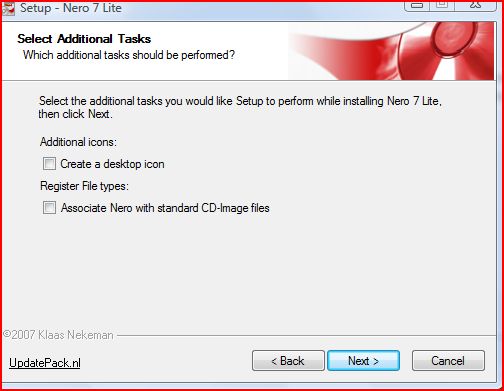
Generally, look up Inno Setup documentation to read about command line switches. The following custom switches are available in Nero Lite:
/USER=“UserName”
Specifies User Name
/COMPANY=“MyCompany”
Specifies Company Name
/SERIAL=“XXXX-XXXX-XXXX-XXXX-XXXX-XXXX-XXXX”
Specifies Serial Number
/TASKS=”desktopicon”
Install a shortcut to Nero Express on the desktop
/TASKS=”quicklaunchicon”
Install a shortcut to Nero Express on the Quicklaunch taskbar
/TASKS=”imagefile_assoc”
Associate standard image formats with Nero (cue, img, iso)
You can combine several tasks by using a comma as delimiter between arguments.
Have you ever tried Dvorak?
In today’s world of computers its nice to be able to type fast without having to look constantly at the keys while typing.
So you probably took some time to learn to type on a Qwerty keyboard.
Why switch to Dvorak typing?
There are lots of reasons to switch to Dvorak. It allows you to type faster with less finger travel on the keyboard.
You can find a lot of information about Dvorak online.
I switched to using Dvorak a few years ago. It was hard in the beginning, but although it was tough, I noticed typing felled a bit more pleasant. I continued to practice and steadily became better. After a few months I typed faster and with less errors than I had ever before. But the most remarkable was I felt less strain in my fingers. Typing was not a soar anymore, but actually fun.
So I can probably tell more about my great Dvorak experience, but you probably want to know if there is a catch.
Yes, there is a catch when switching to Dvorak on a Windows PC. If you are a heavy computer user you are probably accustomed to using keyboard shortcuts. I personally rely heavily on shortcuts to copy and paste text, images and files using CTRL-C and CTRL-V. For these single hand combos I press instinctively the corresponding keys with my left pinkie and index finger.
When you switch to Dvorak you don’t actually loose keyboard shortcuts, but as almost all keys are changed, the single hand key combinations on the left part of the keyboard are moved and will force you into using two hands. So say goodbye to using the mouse and the keyboard at the same time!
Another issue is that if you are used to using dead key combinations to enter diacritics, there is no such thing in the default Dvorak keyboard layout.
The first issue is easy to solve using a custom keyboard layout which automatically switches to Qwerty when pressing the Control key. A clever trick when pressing the Control key the assigned keyboard layout gets overruled by the actual key pressed.
The second issue can be solved by using a custom keyboard layout which adds the dead keys combinations.
I have combined both layouts into the Dvorak Qwerty International keyboard layout using Microsoft Keyboard Layout Creator.
Download
dvqw_int.zip
(Should install fine on Windows XP, Vista and higher)
Some history…
I started the Nero Lite project about 2 years ago when Nero 7 was released. When I got into creating an unattended windows installation I also wanted to include some software with it. However the standard CD size was limited, so including a full Nero installer was out of the question. So I went along creating my own installer.
In early stage Nero Lite was just a simple installer, but people liked the idea of a rewritten setup and kept asking for more features and multi-language installers.
Activation of Nero serial numbers didn’t work in early versions. So if you did not have previously installed a Nero full version the software didn’t work. Luckily I discovered the Nero ProductSetup tool which also provides a user interface to enter serial numbers. An automated script now enters the required information during setup.
Nero Lite size is brought down thanks also to resource optimizations. Nero 8 Lite contains optimized Nero binary files which uses smaller icons and 8-bit bitmaps. Last months I have worked on improving the Nero Lite SDK which allows people to build and customize their own copy of Nero.
Since Nero 7 Lite didn’t contain all these resource optimizations it took a bit of work to port back all these changes to support Nero 7.11.6.0. When doing this I also fixed some Nero 8 Lite bugs.
To maintain such a large project is very useful to me, and automating does save time after all.
You can download latest Nero 7 Lite, Nero 8 Lite and Nero Lite SDK (for developers only) here.